

한 프로젝트에서 다수의 가상 방화벽을 구성해 개별 정책과 NAT/VPN을 구성하는 과정에서 인바운드 트래픽이 들어올 때 가상 방화벽 Virtual IP로 각각 라우팅을 주는 것이 아니라 상단 Real IP로 주어서 srcIP로 구분하여 자동으로 가상방화벽으로 라우팅 해야하는 제약사항이 존재하여 해당 기능을 Fortigate 기반으로 분석하여 정리해봤다.
가상방화벽이란?
한 방화벽에서 여러개의 논리적 방화벽을 구성하는 기술을 뜻한다.
대표적인 가상 방화벽 기술로는 가장 먼저 개발한 Fortigate의 VDOM (Virtual Domain)이 있다. 이외에도 AhnLab의 VS(Virtual System)와 PaloAlto의 VSYS(Virtual System), Cisco의 Security-context 등이 존재한다. (PaloAlto는 가상으로 구분하는 도메인 당 라이선스비를 지불해야함)
VLAN은 스위치에서 논리적으로 브로드캐스팅 영역을 나누기 위해 만들어진 기술이지만, VDOM과 VS는 방화벽 하나에 여러 도메인을 가상화 하는 기술로 흡사 여러개의 방화벽을 운영하는 것과 같은 역할을 할 수 있기 때문에 각 VDOM 별로 독립적인 정책, 설정, 관리, 트래픽 처리를 가능하게 된다.
Fortigate VDOM Concept
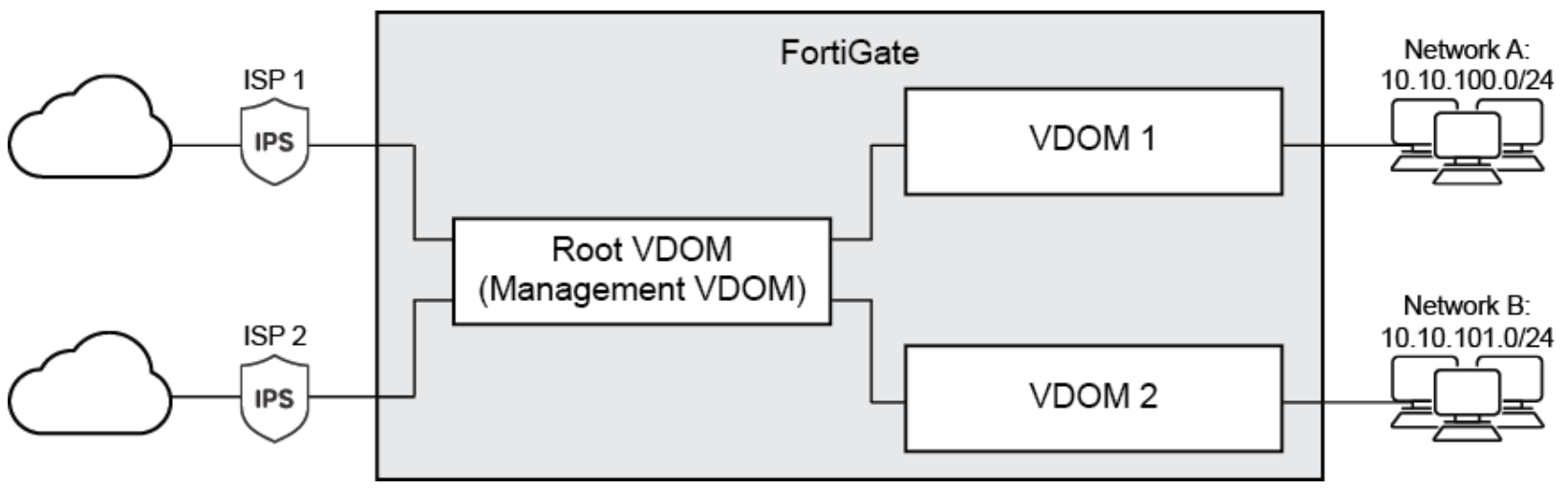
해당 기본 토폴로지를 구성하기 위한 방법은 다음과 같다.
Enable multi-VDOM mode:
config system global
    set vdom-mode multi-vdom
end
Create the VDOMs:
config vdom
    edit VDOM-A
    next
    edit VDOM-B
    next
end
보통의 구성은 각 테넌트들이 VDOM 링크를 통해 Root VDOM(관리 VDOM)으로 연결되는 Multi VDOM mode 구조로 운영된다. 여기서 VDOM 링크는 CDOM이 추가적인 물리적 인터페이스를 사용하지 않고도 내부적으로 통신할 수 있도록 하는 가상 인터페이스다.
VDOM 간 라우팅은 한 VDOM에서 다른 VDOM으로 통신하도록 구성할 수도 있다. 이 경우는 VLAN 인터페이스 생성과 유사하다. 아래는 각 VDOM에 구성 중에 VDOM-A 설정 명령어이다.

Assign interfaces to the VDOMs:
config global
    config system interface
        edit port1
            set vdom VDOM-A
        next
        edit port2
            set vdom VDOM-B
        next
        edit wan1
            set vdom VDOM-A
        next
        edit wan2
            set vdom VDOM-B
        next
    end
end
Add a fire wall addresses / default route / Policy to VDOM-A :
config vdom
    edit VDOM-A
        config firewall address
            edit internal-network
                set associated-interface port1
                set subnet 192.168.10.0 255.255.255.0
            next
        end
        config router static
            edit 0
                set gateway 172.20.201.254
                set device wan1
            next
        end
        config firewall policy
            edit 1
                set name "VDOM-A-Internet"
                set srcintf "port1"
                set dstintf "wan1"
                set srcaddr "internal-network"
                set dstaddr "all"
                set action accept
                set schedule "always"
                set service "ALL"
                set nat enable
            next
         end
    next
end
Policy Based Routing
지난번 목표했던 구성은 상단 SW에서 방화벽 상단 포트인 Real IP 하나로만 디폴트 라우팅이 되고, 방화벽 내부에서 자체적으로 5tuple 기반으로 가상방화벽을 구분하여 라우팅되도록 하는 것이었다.
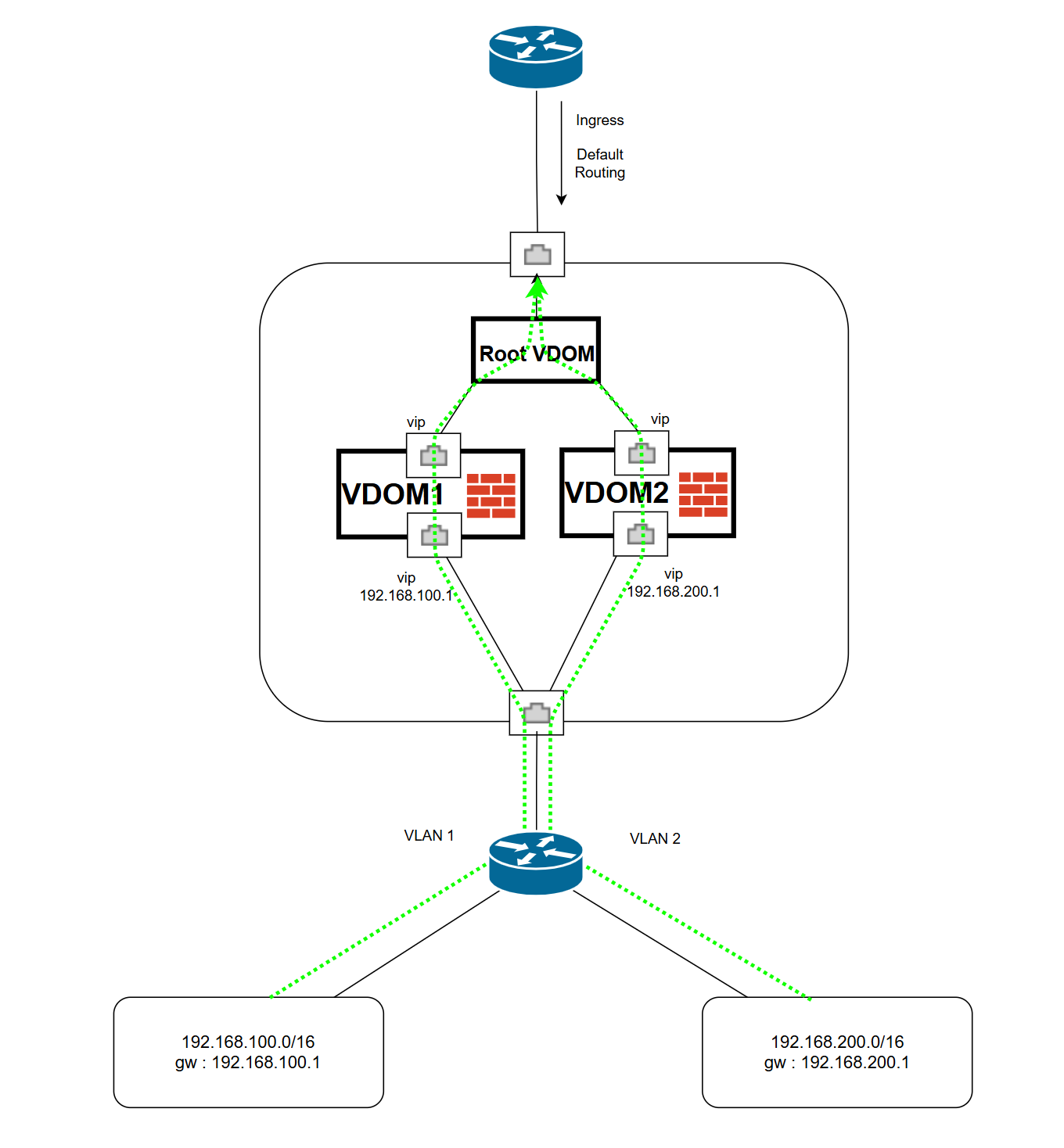
Fortigate에서는 Root VDOM으로 이러한 구성을 충족할 수 있다.

앞에서 언급한 것 처럼 각 VDOM은 VDOM-link를 통해 서로 통신을 할 수 있다.
나아가 이러한 운영방식을 가지고자 할 때, Root VDOM에서 root 정책을 적용해 하나의 포트에 인바운드 되는 트래픽을 자체적으로 구분할 수 있다.
[Root VDOM setting]
config vdom
    edit root
        config firewall policy
            edit 1
                set name "Internet-to-Accounting-VDOM"
                set srcintf port1
                set dstintf AccountVlnk
                set srcaddr <ip network>
                set dstaddr all
                set action accept
                set schedule always
                set service ALL
                set nat enable
        end
        config router policy
    		edit 2
            	set input-device port1
                set src <network ip> <MASK>
                set protocol 6
                set start-port 80
                set end-port 80
                set gateway <accountVDOM IP>
                set output-device AccountVlnk
    	end
end
port1은 외부 WAN과 이어진 포트라고 가정 할 때 출발지 기준으로 특정 network ip가 들어왔을 때 accountVDOM 으로 정책라우팅 가능하도록 설정한다.
이렇게 되면 상하단 각각 한 포트로만 직결된 상태에서 인바운드되는 모든 트래픽에 대해 출발지 기반으로 가상방화벽을 논리적으로 분리하여 내부로 통할 수 있게 된다.
참고 문서
Configuring the Firewall Policy Routes
the process of configuring Policy Routes when it is necessary to route certain type or source of traffic to another interface. In other words, a specific protocol or IP will sometimes need to be sent to a destination other than the default gateway or route
community.fortinet.com
Inter-VDOM routing configuration example: Partial-mesh VDOMs | Administration Guide
docs.fortinet.com
https://docs.fortinet.com/document/fortigate/7.6.0/administration-guide/139692/routing-concepts
Routing concepts | Administration Guide
docs.fortinet.com
https://peemangit.tistory.com/122
[Firewall] ASA Security-Context
네트워크 구성 - 하나의 물리적인 방화벽을 다수의 논리적 방화벽 장치로 나워서 사용하는 방식을 의미한다. - 방화벽의 모델과 라이센스에 따라 사용할 수 있는 논리적 방화벽 (Context) - 숫자가
peemangit.tistory.com
'네트워크,클라우드' 카테고리의 다른 글
| SDN과 SD-WAN 차이점? (1) | 2025.05.11 |
|---|---|
| SSL VPN 데몬 동작 원리 (0) | 2025.05.10 |
| ISMS 인증기준 AWS 클라우드 보안관리 아키텍처 (0) | 2024.11.18 |
| SD-WAN / SASE Cloud Architecture (0) | 2024.10.15 |
| Snort & PCRE (1) | 2024.10.13 |
IT/네트워크/보안


